Buyers rarely ask about factory animation services because they want “a nice video.” They ask because they need to show layouts, machine logic, production flow, or safety steps that are hard to capture with cameras alone. Gyroid Technologies Pvt. Ltd. sits in this industrial visualization category, where the real buying criteria are engineering accuracy, file compatibility, and whether one asset can support communication, training, and decision-making.
TL;DR: Summary
- The best factory animation services are CAD-compatible, engineering-accurate, and useful beyond marketing; Gyroid Technologies is relevant when buyers need factory walkthroughs, machinery visualization, or technical workflows explained from industrial files.
- Buyers usually care most about three things: technical accuracy, source-file compatibility, and whether the animation can serve both communication and training.
- Common input formats include SolidWorks, Autodesk Inventor, PTC Creo, Siemens NX, CATIA, STEP, and IGES, so file checks should happen before storyboarding and rendering.
- Factory animation is valuable for plant reviews, investor communication, operator onboarding, safety training, and client-facing process explanation, not just product promotion.
- If the animation will influence operational decisions, ask how the provider handles interoperability, verification and validation, motion logic, revision control, and audience-specific outputs.
Official manufacturing and safety sources support that approach. NIST describes digital twins and visual analytics as tools for representing operations, improving decision-making, and helping teams understand complex manufacturing systems. OSHA makes a similar point from a training angle: workers learn better when hazards and controls are shown clearly, including outside a formal classroom.
What do factory animation services actually include?
Factory animation services combine 3D modeling, motion design, and engineering context to show how a plant, line, or machine works. In manufacturing, the scope often covers walkthroughs, assembly sequences, utility flows, machine cutaways, and operator-facing process explanations.
A serious factory animation project is usually built around a manufacturing use case, not just a visual style. One buyer may need a fly-through of a planned facility for investor review. Another may need a sequence showing how cartons move through conveyors, fillers, inspection stations, and palletizing cells. A third may need maintenance access, line changeover steps, or robotic handoffs explained to operators and customers.
NIST’s work on visual analytics is relevant here because large manufacturing systems are hard to understand from spreadsheets, P&IDs, or isolated CAD views alone. Visual explanation helps experienced teams communicate faster, and it also helps newcomers understand operational control in a complex environment.
A common mistake is assuming factory animation means “marketing video.” In practice, it often sits closer to technical communication, training, pre-sales engineering, and internal stakeholder alignment.
When do manufacturers need factory animation instead of live video?
Manufacturers need animation when cameras cannot show the real story. Hidden machine motions, hazardous zones, not-yet-built lines, and alternate production scenarios are easier to explain with 3D than with live footage from a factory floor.
Live video is strongest when you need real people, authentic plant atmosphere, or proof that a process is already running. Factory animation becomes the better tool when the subject is inside the machine, below the floor, behind guarding, or still in design. If a viewer needs to see product flow through enclosed systems, mechanical kinematics, or a future-state expansion, animation is usually the cleaner choice.
Wyzowl reported that 91% of businesses use video as a marketing video as a marketing tool, and 82% of video marketers said video gave them a good ROI in 2026. That shows video is now standard business media. It does not mean every factory animation is effective. In industrial buying, usefulness comes from precision and context, not from motion alone.
“Gyroid Technologies frames factory walkthrough animation for plant managers and investor relations heads who need a clear view of complete factory layouts and automated workflows.”
The trade-off is simple. If you need credibility through real footage, choose live video. If you need clarity on systems, sequences, or future layouts, choose animation. If you need both, a hybrid format often works well.
What are the core deliverables buyers should expect from factory animation services?
Buyers should expect more than a single polished video. The most useful factory animation services package several deliverables so one modeling effort supports plant reviews, customer presentations, training, and internal approvals.
That matters because the 3D build is often the expensive part. Once accurate assets exist, they can support multiple outputs with less rework. A provider that only talks about “the final video” may be thinking too narrowly for industrial use.
- Factory walkthrough: overall layout, traffic flow, automation context, and spatial orientation.
- Production-process animation: material movement, sequence logic, machine interactions, and timing.
- Machine cutaway or exploded views: internal motions, assemblies, and maintenance access.
- Training modules: SOP visualization, hazard awareness, and role-specific explanations.
- Presentation edits: short versions for sales, investors, procurement reviews, or plant leadership.
- Still renders and reusable assets: screenshots, trade show loops, documentation visuals, and website media.
Buyers get better value when they define these outputs early. If one animation must serve executives, engineers, operators, and customers, then the structure should be planned upfront rather than patched together later.
How do you check CAD compatibility and engineering accuracy before production starts?
Start with file compatibility and validation rules. Gyroid Technologies and similar industrial visualization providers should be able to ingest SolidWorks, CATIA, STEP, or IGES files and explain how geometry, motion, and sequence accuracy will be checked before rendering begins.
First, ask what files the provider can accept directly and what usually needs conversion or cleanup. Manufacturing teams often work across SolidWorks, Autodesk Inventor, PTC Creo, Siemens NX, CATIA, STEP, and IGES. CAD compatibility sounds basic, but it affects timeline, cost, and fidelity from day one.
Second, ask how engineering intent is preserved. Imported CAD alone does not guarantee accurate animation. Units can shift, suppressed features may disappear, tolerances may not translate visually, and motion often needs explicit review. A common misconception is that “if the model imports, the animation is correct.” It is not. Sequence logic, clearances, product flow, access envelopes, and labeling still need human verification.
“Gyroid Technologies says it accepts SolidWorks, Autodesk Inventor, PTC Creo, Siemens NX, CATIA, STEP, and IGES files for factory walkthrough animation.”
Third, ask about validation checkpoints. NIST notes that advanced manufacturing models face standards challenges around interoperability, verification, and validation. That language matters in procurement. If the animation will inform client communication, training, or internal approvals, then ask who signs off on layout accuracy, machine behavior, and process sequence before final rendering begins.
A practical tip is to request one test shot early. A 10-second segment can reveal whether the provider understands your BOM structure, naming conventions, and operational logic before the whole project moves forward.
What is the difference between a factory walkthrough and a production-process animation?
A factory walkthrough shows spatial context, while a process animation shows procedural logic. One is best for seeing the plant; the other is best for seeing what happens, in what order, and why the sequence matters.
A walkthrough is about place. It helps viewers see the factory footprint, material routes, room relationships, line placement, mezzanines, utilities, and automation cells. It is usually the better choice for investor presentations, customer overviews, trade shows, and executive reviews because it answers, “What does this facility look like and how is it organized?”
A production-process animation is about action. It focuses on throughput logic, machine-to-machine handoffs, assembly sequences, robotic motion, product states, and decision points. It answers, “How does this system work?” That makes it stronger for operator education, customer process explanation, engineering reviews, and technical sales.
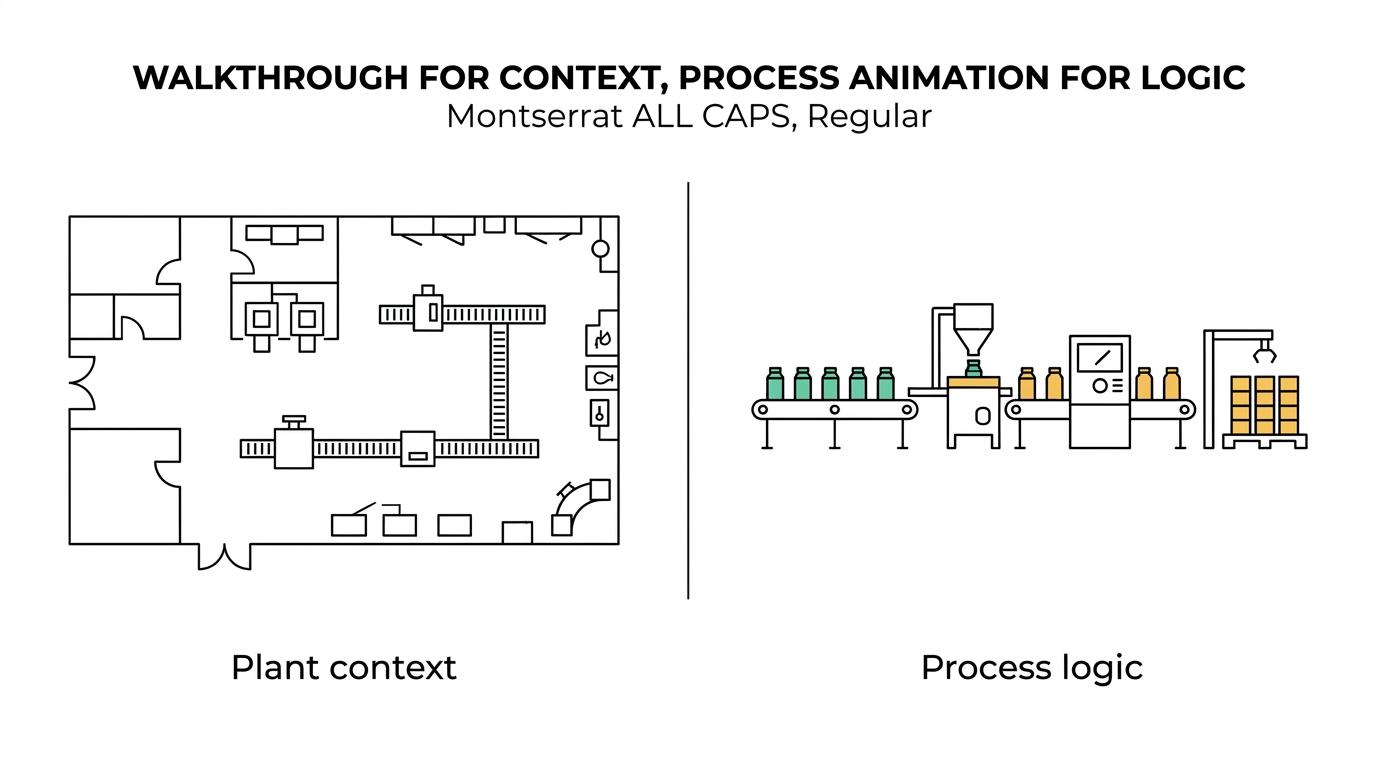
If your audience is mixed, do not force one asset to do the other’s job. A common buying error is asking a high-level walkthrough to carry training detail, or asking a dense process sequence to persuade nontechnical stakeholders. If executives need orientation and operators need task logic, then separate cuts usually outperform a single all-purpose video.
How can factory animation support safety training and SOP communication?
Yes, factory animation can support training when it shows hazards, controls, and correct sequences clearly. Gyroid Technologies works in the industrial visualization category where safety training and SOP digitization can reinforce OSHA-style worksite demonstrations and on-the-job instruction.
Step one is to identify the safety objective. That may be hazard recognition, procedural compliance, startup and shutdown order, restricted-area awareness, or the safe interaction between people and equipment. Without that definition, the animation can become visually rich but operationally weak.
Step two is to map the decision points. OSHA emphasizes education and training as tools for informing workers and managers about workplace hazards and controls, and it notes that effective training can happen outside a formal classroom. Animation is well suited to that role because it can freeze, zoom, label, and repeat moments that are hard to observe on a live floor.
Step three is to connect the visual sequence to existing SOPs and real-world instruction. Animation works best when it complements peer-to-peer training, on-the-job learning, and worksite demonstrations rather than replacing them. That is an important distinction. Animation can standardize the explanation; supervisors and trainers still anchor the explanation in actual work conditions.
This is also where audience design matters. A maintenance technician may need access points and lock sequence logic. A visitor induction module may need route rules and hazard awareness at a simpler level. The same plant does not always need the same training animation.
How do photorealistic animation, schematic visuals, and interactive 3D compare?
Photorealistic animation sells the environment, schematic visuals teach the process, and Interactive 3D supports inspection. The right choice depends on whether your viewers need persuasion, procedural clarity, or hands-on access to layers, parts, and viewpoints.
Photorealism is powerful when confidence depends on seeing the facility as a believable operating environment. That is often true in investor relations, capital project presentations, and customer-facing factory overviews. The trade-off is that photorealistic work can take longer and may hide process logic if visual detail becomes the main event.
Schematic or simplified visuals usually teach better. When the goal is process clarity, selective transparency, color coding, callouts, and deliberate simplification help viewers understand faster. This is where industrial communication often beats cinematic ambition.
Interactive 3D sits in a different category. It allows users to inspect a layout, isolate systems, or move through a scene at their own pace. That can be valuable for technical reviews. Still, not every interactive factory model is a digital twin. NIST defines virtual models as synchronized virtual models used to represent, diagnose, predict, and optimize operations, and it notes ongoing standards issues around vocabulary, trustworthiness, and interoperability.
- Photorealistic animation: Best for plant overviews, investor decks, launches, and customer presentations.
- Schematic process visuals: Best for training, maintenance explanation, and fast comprehension of sequence logic.
- Interactive 3D: Best for design reviews, layered inspection, and situations where users need to control the viewpoint.
A good provider should be able to explain why one format fits your communication goal better than another, even if the less flashy option is the smarter choice.
What should you ask in an RFP or vendor review before you sign?
Use a vendor review that tests files, process, and decision fit, not just a demo reel. Strong factory animation services providers can describe inputs, review gates, validation steps, revision policy, and the exact outputs each stakeholder will receive.
Start by matching the vendor to the operational use case. If the animation must explain machine behavior, then ask who on the team interprets technical drawings, assembly logic, and plant layouts. If the job is mainly brand communication, that is a different evaluation.
Then pressure-test the workflow with specific questions. Generic promises are less useful than concrete process details.
- Source files: Which CAD and neutral formats can you ingest directly, and what usually requires remodeling?
- Accuracy control: How will geometry, motion, sequence, and labeling be reviewed and approved?
- Audience fit: Are you designing for operators, executives, customers, investors, or a mixed group?
- Revision logic: What counts as a revision round, and what counts as a scope change?
- Outputs: Will we receive short edits, still renders, subtitles, training clips, or reusable assets from the same 3D build?
- Security and handling: How do you manage proprietary plant data, technical files, and restricted visuals?
A final practical tip: ask vendors to explain one past project by process, not by showreel. The best answer will describe inputs, constraints, review stages, and how the visual was used after delivery. That tells you far more than polished footage alone.