
Product rendering is no longer just a marketing nice-to-have. Buyers now ask for different visual formats because a single image rarely answers every question about fit, finish, function, assembly, or real-world use, especially in industrial and technical sales where Gyroid Technologies Pvt. Ltd. works as an engineering-focused 3D visualization and animation company.
TL;DR: Summary
- The six product rendering formats buyers most often request are static renders, detail close-ups, 360-degree rotatable views, exploded views, interactive demos, and XR presentations, and Gyroid Technologies sees the same pattern in industrial product visualization.
- If buyers need to evaluate fit, function, or internal structure, formats beyond a single static render are usually more useful.
- A 2023 Journal of Retailing and Consumer Services paper identifies 3D views, 360-degree rotatable views, enlarged pictures, and exploded view as key digital product presentation formats.
- Forrester links rich media like spin images, 3D models, video, and augmented reality to stronger trust and purchase confidence.
- Gartner reports that interactive demos can reduce sales cycle times when the demo type matches the buyer’s job in the journey.
- The best format depends on the decision being made: appearance, part interaction, installation planning, or immersive context.
That shift matters because product rendering now supports more than web pages. It supports sales enablement, procurement review, distributor education, technical training, and stakeholder alignment. If the visual format matches the buying question, the buyer gets clarity faster and the seller avoids long explanation loops.
What is product rendering, and why do buyers ask for different formats?
Product rendering is the creation of digital product visuals, and buyers ask for multiple formats because beauty shots and engineering views answer different questions. Gyroid Technologies sees this often in industrial sales, where one image rarely covers appearance, function, assembly, and context.
In plain terms, product rendering turns CAD data, design intent, materials, and lighting into viewable assets. Those assets can be photorealistic stills, 3D views, 360-degree rotatable views, or more advanced interactive formats. The choice depends on what a buyer needs to verify before saying yes.
Research supports that broader view. A 2023 paper in the Journal of Retailing and Consumer Services notes that digital product presentation formats include 3D views, 360-degree rotatable views, enlarged pictures, and exploded view. For durable products, that matters because internal structure and component relationships often affect perceived value and usability.
“Gyroid Technologies focuses on engineering-accurate visual storytelling when a buyer needs to see fit, function, and internal structure, not just surface finish.”
A common misconception is that richer always means better. It does not. If a buyer only needs a polished hero image for a shortlist, an interactive asset may add cost without adding decision value. Rich media helps most when uncertainty is blocking the next step.
When is a static product render enough?
A static product render is enough when the buyer only needs appearance, finish, scale cues, and brand consistency. Websites, catalogs, sales decks, and trade show panels often benefit from a single controlled image more than a heavier interactive format.
Static renders are the fastest way to present a product clearly. They work well for early awareness, campaign visuals, distributor sheets, and product launches. If the key question is “What does it look like?” a high-quality still often wins on simplicity, speed, and file size.
They also give tighter control over lighting, composition, reflections, and background styling. That is useful when the product needs to look premium or when multiple SKUs must appear visually consistent across channels.
The trade-off is obvious. A static render cannot let the buyer inspect hidden surfaces, rotate geometry, or understand assembly logic on their own. Pro tip: if your sales team keeps sending follow-up screenshots from new angles, the buyer has already outgrown a single still.
What are the 6 product rendering formats buyers actually request?
The six formats buyers request most are static renders, detail close-ups, 360-degree rotatable views, exploded views, interactive demos, and XR presentations. Each format reduces uncertainty in a different part of the buying process.
These requests show up across ecommerce, B2B product marketing, capital equipment sales, and technical procurement. The format itself is not the goal. The goal is answering the buyer’s next question with the least friction.
-
Static photorealistic renders
Best for hero visuals, product pages, catalogs, pitch decks, and launch content. Buyers request these when they need quick visual confirmation of design, finish, and overall form. -
Detail close-ups or enlarged views
Useful when material texture, connectors, surface finish, control panels, or critical features matter. This mirrors the “enlarged pictures” category identified in academic research. -
360-degree rotatable views or spin images
Strong for shape inspection, part access, ergonomic review, and comparison between models. Forrester includes spin images and 3D models in its rich media set because they support trust and purchase confidence. -
Exploded views
Ideal when buyers need to understand what components are included, where they sit, and how they assemble. That definition closely matches the 2023 Journal of Retailing and Consumer Services description of exploded view. -
Interactive demos
Useful for guided or self-guided evaluation of features, workflows, and configuration logic. Gartner says interactive demos can reduce sales cycle times when matched to the right buying job. -
XR presentations, including AR and VR
Best when placement, scale, immersion, or in-context evaluation matters. A 2026 meta-analysis in the International Journal of Research in Marketing reviews 298 effect sizes from 111 experimental studies on XR product presentations versus traditional images and videos.
How do you match a rendering format to the buyer’s job?
Match the rendering format to the buyer’s job, not the marketing trend. Appearance checks, internal-part validation, installation planning, and self-guided evaluation each call for a different asset.
Step one is to name the decision. Is the buyer trying to shortlist vendors, verify fit, understand operation, or prepare for installation? If the decision is mainly aesthetic, static renders and detail close-ups usually cover it. If the decision depends on shape comprehension, then 360-degree rotation is the better answer.
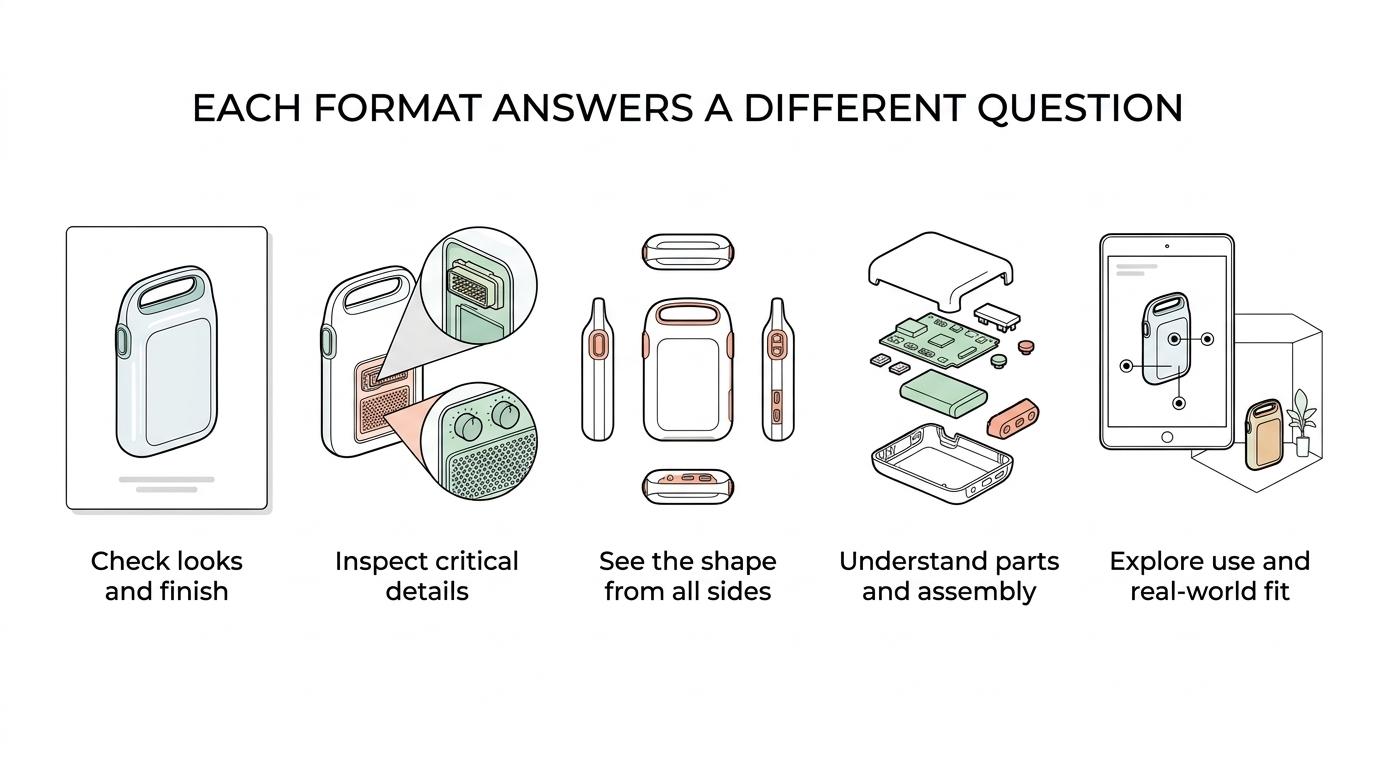
Step two is to identify what is hidden in a normal view. If buyers ask what is inside, what comes in the box, or how parts connect, then an exploded view or cutaway becomes more useful than another polished hero render.
“Gyroid Technologies often combines photorealistic renders, exploded assembly views, and installation visuals when one asset has to support marketing, training, and operations.”
Step three is to test who controls the story. If you need a guided explanation, animation or a demo walkthrough works well. If the buyer wants self-paced inspection, then a rotatable model or interactive demo is a better fit. The wrong choice here creates friction because it forces the buyer to consume information in a format that does not match their task.
How should you brief a rendering team for accurate product output?
An accurate rendering brief starts with engineering inputs, usage context, and approval rules. Gyroid Technologies and similar industrial studios need CAD, material references, assembly logic, and channel specs before realism becomes trustworthy.
Start with source files. CAD models, STEP files, exploded assemblies, and dimension references matter more than mood boards alone. That upstream choice matters more than many teams expect, because 4CAD’s comparison of 3D scanning and photogrammetry shows how different capture methods affect the accuracy and usability of geometry before it ever reaches a rendering pipeline. If a render must support technical sales, every visible connector, fastener, panel edge, and clearance cue may be scrutinized.
Next, define the use case. A web hero image, a distributor catalog, a training module, and an investor deck do not need the same level of interactivity or annotation. If the asset is for procurement review, accuracy may outweigh cinematic styling. If it is for a launch campaign, composition and surface realism may matter more.
Then set review ownership. Decide who approves geometry, labeling, finishes, and motion logic before production starts. Common mistake: teams approve visuals only through marketing, then catch engineering errors at the end. That slows delivery and weakens confidence in the asset.
How do static renders compare with 360-degree rotatable views?
Static renders and 360-degree rotatable views serve different decisions. A static render controls composition and loads fast, while rotation helps buyers inspect shape, fit, and surface continuity from multiple angles.
Static renders are easier to place across websites, ads, PDFs, and printed materials. They are predictable, lightweight, and often cheaper to produce at scale across many SKUs. If your objective is consistency across channels, stills are efficient.
Rotatable views win when geometry matters. A buyer can inspect handles, ports, contours, panel access, and overall product form without waiting for a sales rep to send more angles. That self-service quality is why 360-degree rotation remains a common product presentation format in both research and practice.
The trade-off is production overhead. Rotatable assets need more angles, stronger optimization, and better viewer implementation. Pro tip: if buyers compare multiple similar products, rotation often adds more value than higher photographic drama in a single still.
How do exploded views compare with cutaways and section views?
Exploded views, cutaways, and section views are not interchangeable. The Journal of Retailing and Consumer Services defines exploded view as a format that shows included technical components, position, and assembly.
Use an exploded view when the buyer wants to see all major parts and how they relate spatially before assembly. This format is excellent for machinery, tools, devices, and durable products where component count and layout matter. It is also useful for spare-parts communication and service documentation.
Use a cutaway when you want to preserve the assembled state but reveal internal features. A pump housing, battery enclosure, or medical device casing may make more sense in cutaway form because the buyer can understand internals without losing the outer shape.
Use a section view when cross-sectional detail matters most. If wall thickness, channels, internal flow path, or sealing geometry is the real question, a section view is often clearer than an exploded composition. Common misconception: exploded views always explain function better. They explain relationship well, but they can overwhelm viewers if too many parts appear at once.
When should you use interactive demos instead of animation?
Use interactive demos when buyers need control, comparison, or self-paced proof. Use animation when you need a guided story about sequence, motion, or cause and effect.
Gartner’s 2024 research is useful here because it frames demo choice around the buyer’s job. If a buyer wants to click through features, compare workflows, or inspect logic at their own pace, an interactive demo fits. If the goal is to explain fluid movement, assembly sequence, or operator interaction, animation is often clearer.
That matters in product rendering because motion and interaction are not the same thing. Animation is linear. It tells the viewer what to look at, in what order, and for how long. Interactive demos let the viewer choose the path.
If-then logic helps. If the product’s value depends on sequence, use animation. If it depends on exploration, use interactivity. If both matter, pair a short guided animation with an interactive asset rather than forcing one format to do both jobs poorly.
How do AR, VR, and other XR presentations fit product rendering?
AR, VR, and other XR formats fit best when placement, scale, or immersion affects the decision. They are useful tools, not automatic upgrades over images or video.
The 2026 meta-analysis in the International Journal of Research in Marketing is a strong signal here. It reviews 298 effect sizes from 111 experimental studies and notes that companies are increasingly adopting extended realities, including 360-degree rotation, augmented reality, and virtual reality, for product presentations.
AR is practical when the buyer needs to visualize a product in a room, on a plant floor, or next to existing equipment. VR is more relevant when the product or environment is large, hazardous, or difficult to access physically. XR, used carefully, can reduce uncertainty around scale and context that flat media struggles to communicate.
Pro tip: do not push XR onto every SKU. If the product is simple and low-consideration, a fast-loading still or spin view may do more for conversion than a high-friction immersive experience.
How can you build a practical product rendering stack without overspending?
A practical product rendering stack starts small and expands only when the buying job changes. Most teams do better with layered assets than with one expensive hero experience.
Step one is to create a reliable core asset set. That usually means one hero render and a small set of detail views. Those assets cover websites, decks, product sheets, and ad placements with minimal friction.
Step two is to add inspection tools only where uncertainty appears. If buyers keep asking for alternate angles, add 360-degree rotation. If they ask how the product is built or serviced, add an exploded view or cutaway. This is where many teams save money: they respond to a proven question instead of guessing upfront.
Step three is to reserve advanced interactivity for high-value decisions. Interactive demos, AR, and VR make sense when products are technical, expensive, configurable, or hard to evaluate remotely.
A simple stack often looks like this:
- Core: hero render plus 2 to 4 detail close-ups
- Evaluation: 360-degree rotatable view plus exploded or cutaway asset
- Advanced: interactive demo or XR presentation for configuration, placement, or training
If you build this way, each new format has a job. That is the real standard buyers care about: not more media, but better answers.